
Client portal guide
Getting started with your client portal
Your studies, dashboards, negotiation documents and messages with our team are kept in one secure place. Watch the short tour, then follow the steps for your first sign-in.
The tour
See the portal in 90 seconds
Guided tour with a sample account, about a minute and a half. Narrated, with captions.
Your first sign-in
Four steps to get in
Open your invitation email
We email your board an invitation. The subject starts with “Your Advanced client portal is ready.” Click the private link inside. It works once and expires in 14 days.
Choose your board’s password
Use 9 characters or more. Your board shares one sign-in, so share the password with your board members.
Sign in
Go to portal.
advancedcorporations.com . Enter your board’s sign-in email and the password you chose.Enter your one-time code
Each time you sign in, we email a six-digit code. Pick the board member who should get it, then type the code. This keeps your documents safe.
Inside the portal
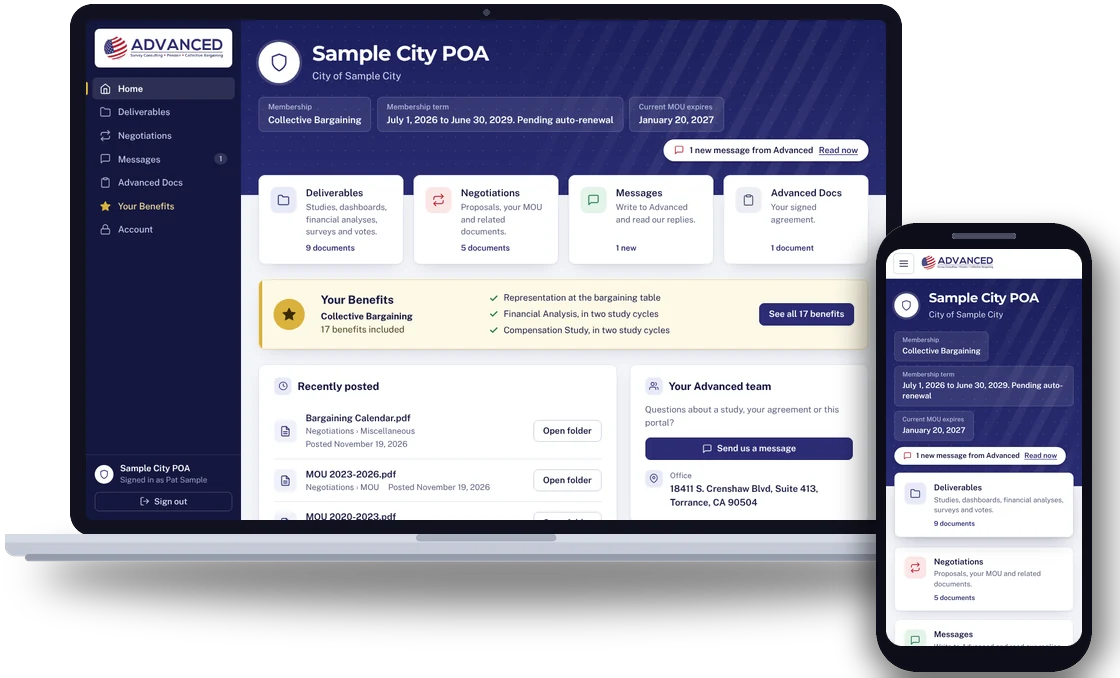
What you will find
Home
Your membership, your term, your MOU date and anything new from us.
Deliverables
Your compensation studies, dashboards, financial analyses, survey results and voting results. The newest is marked Current.
Negotiations
Your proposals, your MOU and other negotiation documents.
Messages
Write to our team and read our replies in the same place.
Advanced Docs
Your membership details and your signed agreement.
Your Benefits
Everything included in your membership.
On your phone or tablet
Keep the portal on your home screen
The portal works on a computer, phone or tablet. On a phone or tablet, add it to your home screen and it opens with one tap, like an app. No app store is needed.
iPhone or iPad
Open the portal in Safari. Tap Share, then tap Add to Home Screen, then Add.
Android
Open the portal in Chrome and tap Install on the sign-in page. If you do not see Install, open the browser menu and tap Install app or Add to Home screen.
After that
Tap the Advanced icon to open the portal. You sign in the same way, with your password and a one-time code.
Need help?
Common questions
Forgot your password?
On the sign-in page, choose “Forgot your password?” and we will email you a link to choose a new one.
Is your invitation link not working?
Each link works once and expires after 14 days. If someone on your board already chose the password, ask them for it. If not, ask your Advanced representative for a new invitation.
Other questions?
Message us in the portal, or ask your Advanced representative. You can also reach us through our contact page.